Home / C14 to C13 smart power cable

IEC C14 input · IEC C13 output

Turn a C13 PDU outlet into a monitored remote power point.

Smart Kablo C14 to C13 sits between a standard IEC C13 outlet on a PDU or UPS and compatible IT equipment with an IEC C14 inlet. It measures electrical data and provides authorised remote relay control without replacing the entire PDU.
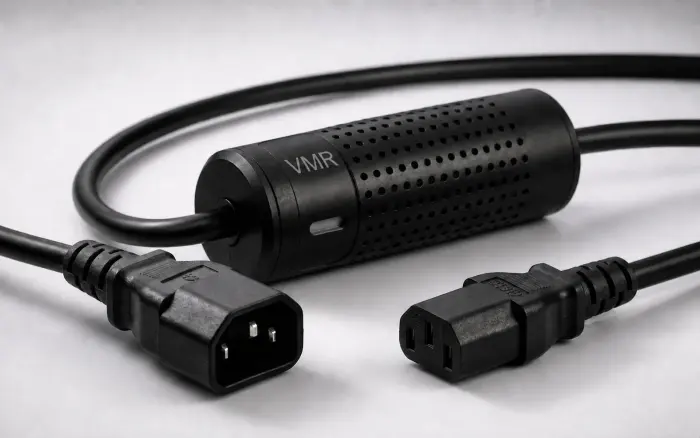
Smart Kablo with IEC C14 input and IEC C13 output for compatible PDU and UPS connections

Select by outlet, equipment inlet and nameplate current—not by equipment category alone.

IEC C14Male input for a C13 PDU or UPS outlet
IEC C13Female output for an IEC C14 equipment inlet
5 A maximumVerify the connected equipment nameplate
Per-device controlMetering and authorised relay operation
Connection review

Match all three sides before installation.

The physical connector fit is only the first check. The source outlet, the equipment inlet and the equipment current rating must all match.

  1. 1PDU or UPSIEC C13 female source outlet
  2. 2Smart KabloIEC C14 male input
  3. 3IT equipmentIEC C13 female cable output to an IEC C14 equipment inlet
Verified specification
Source connectionIEC C13 female outlet
Cable inputIEC C14 male
Equipment outputIEC C13 female
Equipment inletIEC C14
Maximum current5 A
Measured valuesVoltage, current, frequency, power and energy
ConnectivityBluetooth for onboarding; Wi-Fi for authorised remote access
Safety limit: do not connect equipment whose nameplate input current exceeds 5 A. Remote power interruption is not a substitute for an operating-system, storage or application shutdown procedure.
Monitoring and integration

Use each interface for its verified role.

Bluetooth supports nearby onboarding. After Wi-Fi setup, authorised interfaces can expose measurements and relay controls. Integration scope must be checked against the published documentation and the exact firmware.

Bluetooth onboarding

Use Bluetooth during nearby device setup and ownership assignment. It is not presented as the internet control path.

Wi-Fi operation

After configuration, view measurements and use permitted relay controls through the authorised Smart Kablo interface.

REST and SNMP

The current REST guide documents authentication, live telemetry, hourly and monthly energy data, and relay endpoints. SNMP version, MIB/OID, traps and write access require model- and firmware-specific confirmation.

Choose by source outlet

Compare the connection families.

C14 to C13

For a standard IEC C13 female outlet on a compatible PDU or UPS.

C20 to C13

For an IEC C19 female rack PDU outlet. The Smart Kablo limit remains 5 A.

Schuko to C13

For a grounded Schuko source outlet and compatible C14-inlet equipment.

Short answers

C14 to C13 compatibility FAQ.

Which equipment can use this model?
Equipment must have an IEC C14 inlet, be supplied from an IEC C13 PDU or UPS outlet, and show a nameplate input current of 5 A or less. Servers, switches, NAS devices, desktop PCs and monitors are examples, not automatic approvals.
Does it replace a managed PDU?
No. It adds metering and control to selected compatible connections. A managed PDU remains more appropriate when an entire rack and many outlets must be managed together.
Is SNMP included?
Do not assume a specific SNMP version or capability. Confirm MIB/OID coverage, traps and write access for the exact model and firmware before specifying an integration.

Send the outlet, inlet and nameplate details for review.

We will check the connection family, equipment load, cable requirements and requested integration scope before quoting.

Check C14 compatibility