Home / Schuko to C13 smart power cable

Grounded Schuko input · IEC C13 output

Measure and control C13 equipment from a Schuko outlet.

Smart Kablo Schuko to C13 connects a grounded wall outlet to compatible desktop PCs, workstations, monitors and other equipment with an IEC C14 inlet. It adds electrical measurements and authorised relay control at the individual connection.
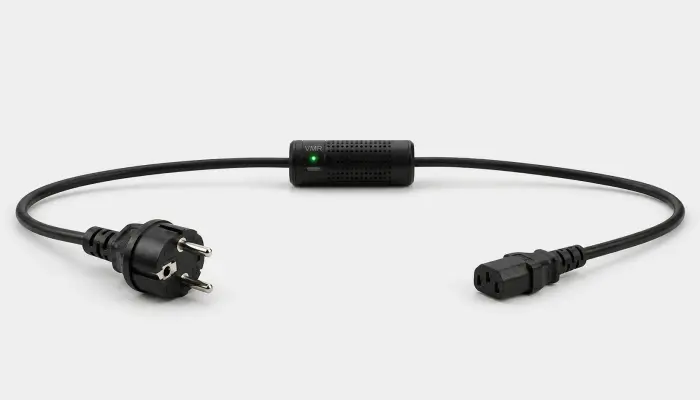
Smart Kablo with grounded Schuko input and IEC C13 female output for compatible PCs and monitors

A Schuko plug does not make every wall-powered load compatible. The output, grounding and 5 A limit must all be checked.

Grounded SchukoSource-side plug for a compatible wall outlet
IEC C13Female output for an IEC C14 equipment inlet
5 A maximumVerify the connected equipment nameplate
Per-device dataPower and energy visibility at the connection
Compatibility first

Choose by connector, grounding and nameplate current.

The source must be a suitable grounded Schuko outlet. The equipment must have an IEC C14 inlet and a nameplate input current no greater than 5 A.

  1. 1Wall outletSuitable grounded Schuko source
  2. 2Smart KabloSchuko input and control module
  3. 3EquipmentIEC C13 female output to an IEC C14 inlet
Verified specification
Source connectionGrounded Schuko outlet
Cable inputSchuko plug
Equipment outputIEC C13 female
Equipment inletIEC C14
Maximum current5 A
Measured valuesVoltage, current, frequency, power and energy
ConnectivityBluetooth onboarding and Wi-Fi operation
Not for general appliances: do not connect heaters, kettles or any other load above 5 A. Product category is not a substitute for checking the equipment nameplate and complete electrical path.
Practical uses

See after-hours demand and recover compatible equipment deliberately.

Desktop and display fleets can draw power outside working hours. Per-device measurement shows the actual load before any shutdown policy or automation is introduced.

Desktop PCs

Measure compatible ATX desktop systems and coordinate remote power restoration with the operating system and BIOS/UEFI configuration.

Workstations

Track an individual workstation connection when its IEC inlet and nameplate load meet the product limits.

Monitors

Review display consumption during occupied and unoccupied periods instead of relying on assumed standby figures.

Integration scope

Keep documented REST capability separate from SNMP assumptions.

The current REST guide documents Basic Authentication, live telemetry, hourly and monthly energy data, and relay endpoints. SNMP version, MIB/OID, traps and write access are not documented there and must be confirmed for the exact model and firmware.

Choose by source outlet

Compare the connection families.

C14 to C13

For a standard IEC C13 female outlet on a compatible PDU or UPS.

C20 to C13

For an IEC C19 female rack PDU outlet. The Smart Kablo limit remains 5 A.

Schuko to C13

For a suitable grounded Schuko outlet and compatible C14-inlet equipment.

Short answers

Schuko to C13 compatibility FAQ.

Which equipment can use this model?
Compatible equipment needs an IEC C14 inlet and a nameplate current of 5 A or less. Desktop PCs, workstations and monitors are common candidates, but each unit must be checked individually.
Can every device with a Schuko plug be connected?
No. Smart Kablo has an IEC C13 equipment output and a 5 A limit. It is not a general-purpose high-load appliance switch.
Can it turn a PC back on?
Restoring AC power is only one part of the process. The PC must be safely shut down first and configured appropriately in BIOS/UEFI if automatic start after AC restoration is required.

Confirm the wall outlet, equipment inlet and current rating.

Share the device type, nameplate information, installation country and requested cable length so technical sales can review the connection.

Check Schuko compatibility