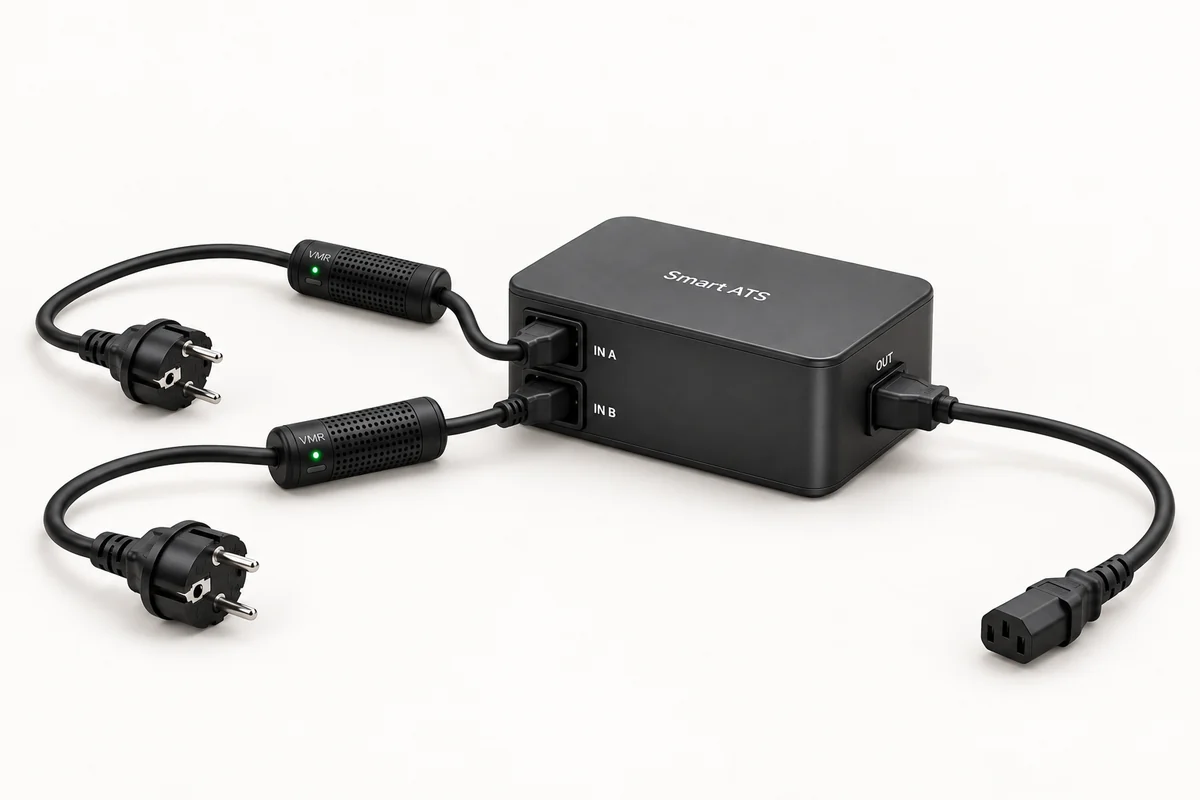
In electrical power systems, ATS stands for Automatic Transfer Switch: automatic transfer from the active source to a backup source. Smart ATS is a compatible transfer box with two Smart Kablo inputs and one load output. Working with Smart Kablo’s software ATS feature, it lets you select a master, keeps only one source active and verifies actual power loss through the box before transferring to backup within 3 seconds. Automatic transfer does not require internet or Cloud access.
What is an ATS system, and what does Smart ATS do?
Having two supply options for an electrical device does not by itself make transfer automatic. An ATS system automates the change by bringing an available backup source into service when the active supply fails.
Smart ATS achieves this through two Smart Kablo cables working with the compatible transfer box. The box has two inputs and a single load output. This arrangement allows the same load to be supplied from an alternative source. Only one cable is active; the other remains the backup.
Two Smart Kablo cables, a Smart ATS box and one load
- Two sources reach Smart ATS. One Smart Kablo connects to each of two outlets. The cables connect to the two inputs on the compatible Smart ATS transfer box; the box’s single output supplies the load.
- A master cable is selected. The cable preferred for normal operation is designated as master. The other is the backup; the two sources do not feed the output simultaneously.
- The backup activates on confirmed power loss. Information from the Smart ATS box verifies that the active source has lost power. The backup cable activates within 3 seconds, supplying the single load from the alternative source.
The Smart ATS box is a required part of this arrangement. Use the compatible box designed for two inputs and one output rather than joining the two cable outputs directly. This arrangement manages active and backup supply for one load; it does not add the sources’ power capacities together.
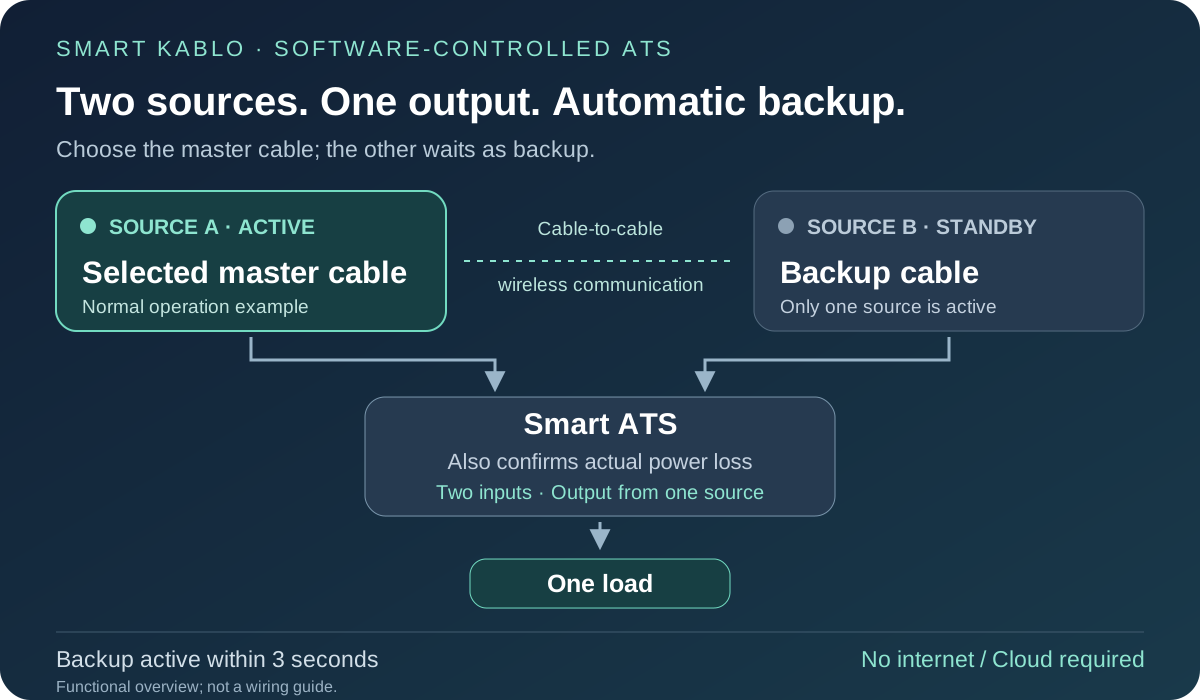
Select the master to set your source preference
Being able to choose the master from the two Smart Kablo cables lets you decide which source normally supplies the load. If your power plan uses A and B feeds, you can designate the cable on your preferred feed as master.
The illustrations show an example with source A selected as master; A is not required to have priority in every installation. Using consistent source names on cable records and physical connections makes the correct feed easier to identify during maintenance.
Wireless communication and actual power verification at the box
The Smart Kablo cables communicate wirelessly with each other. The automatic transfer decision also uses information from the Smart ATS box: the box helps verify whether power has actually been lost at the active source. The backup cable comes into service when that power loss is confirmed.
This operation does not depend on Smart Cloud. Automatic backup transfer continues to work if internet or Cloud access is unavailable. The supply change does not wait for a command sent through the cloud or for someone to intervene in the app.
Backup activation within 3 seconds of active-source power loss
When the active source loses power, the backup cable activates within 3 seconds. This is the backup-supply activation time; the connected equipment’s restart and service-readiness times must be considered separately.
The load’s tolerance of an interruption and its power-supply behaviour matter. If a device restarts, its operating system or application may need additional time to become available. Evaluate automatic backup transfer together with any requirement for uninterrupted service.
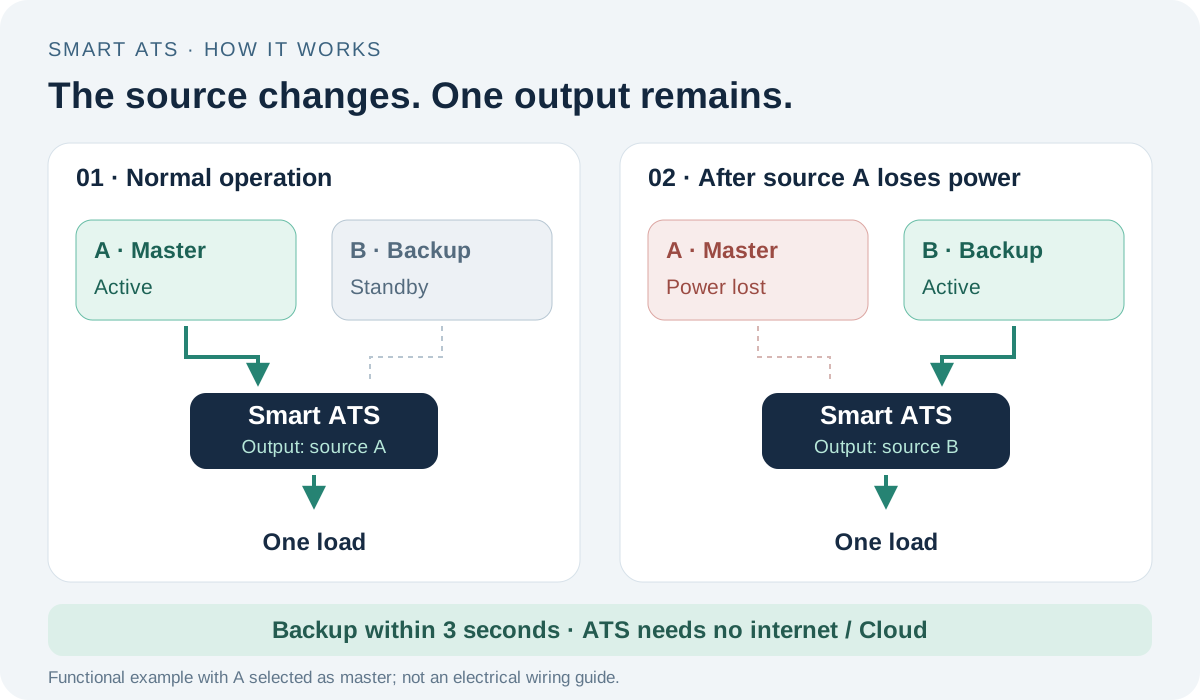
Is Smart ATS a backup power source?
A backup power source provides the energy used during an outage. Smart ATS manages transfer between two existing sources; it does not store energy like a battery. If both sources lose power, the box cannot supply electricity to run the load on its own.
Using a UPS to provide energy throughout an interruption is a separate part of the power plan. Automatic transfer through Smart ATS and energy provision by a UPS address different needs that may complement each other. See the UPS and PDU guide for details. Two outlets sharing the same circuit breaker or upstream supply do not provide independent sources against a failure at that shared point.
Automatic transfer switches and ATS panels: scope matters
Automatic transfer switch also describes hardware that switches sources at panel or installation level. An ATS panel manages transfer between the mains and an alternative source for an electrical installation. Its electrical capacity and installation scope must be assessed differently from a Smart ATS arrangement supplying individual equipment.
Evaluate Smart ATS as a system consisting of two Smart Kablo inputs, the compatible transfer box and one load. First identify the load and sources you need to manage. The smart PDU and smart power cable comparison explains the distinction between individual equipment management and rack power distribution.
Choose compatible cables and a suitable load for Smart ATS
For a wall-outlet source, consider Schuko–C13 Smart Kablo; for a suitable C13 female UPS or PDU outlet, consider the C14–C13 model. A C13 cable output mates with a C14 inlet. The Smart ATS box’s inputs and single load output must also match the installation.
Current Smart Kablo models have a 5 A continuous-current limit per cable. Check the load’s nameplate current and startup demand; using two cables does not increase that limit. Discuss source, load and box compatibility with the Smart Kablo team before finalising your arrangement.
Frequently asked questions about Smart ATS
What does an ATS switch do?
It automatically changes between electrical power sources. Smart Kablo’s automatic transfer switch function works with the Smart ATS box to manage the supply to one load.
Are two Smart Kablo cables enough for Smart ATS?
You also need the compatible Smart ATS transfer box. Two cables feed the box, and its single output supplies the load.
Does ATS work if the internet goes down?
Yes. Automatic transfer uses wireless communication between the cables and power verification through the box, independently of internet and Cloud access.
Do both sources supply the load at the same time?
No. The selected master is active and the other source is the backup. When power loss at the active source is confirmed, the backup activates within 3 seconds.
Does Smart ATS guarantee uninterrupted power?
It provides automatic transfer to backup. Whether the connected equipment avoids restarting depends on its interruption tolerance and any UPS arrangement.